
Last updated: September 28, 2023
Available with any of the following subscriptions, except where noted:
 Marketing Hub
Professional
,
Enterprise
Marketing Hub
Professional
,
Enterprise
|
| Legacy Marketing Hub Basic |
Connect your social media accounts to HubSpot to start creating and publishing social posts, and tracking social media engagements in HubSpot. You can connect accounts from the following social networks to HubSpot:
- Facebook & Instagram
- YouTube (Marketing Hub Enterprise only)
Super admins can set which users and teams have access to specific social accounts. The number of social accounts you can connect depends on your subscription. Learn more about account limits in HubSpot's Product & Services Catalog.
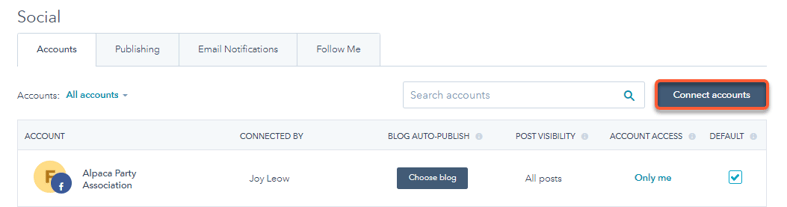
To connect a social media account:- In your HubSpot account, click the settings icon in the top navigation bar.
- In the left sidebar menu, navigate to Marketing > Social.
- In the upper right, click Connect account.
Connect a Facebook or Instagram account
Before connecting your Facebook or Instagram account, do take note of the following:
- Instagram accounts must be business accounts and linked to a Facebook page that you manage in order to be connected to HubSpot. Personal Instagram accounts, Instagram Creator accounts, or Instagram business accounts not linked to a Facebook page cannot be connected to HubSpot. Learn more if you don't see your Instagram Business Account appearing under your Facebook page.
- You can connect Facebook pages that use either the new Pages experience or the classic Pages experience. Connected Facebook pages will be authorized for 90 days before requiring re-authentication. Personal Facebook profiles cannot be connected to HubSpot.
To connect your account:
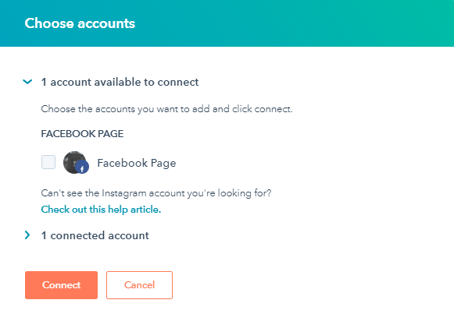
- In the dialog box, select Facebook & Instagram.
- You'll see any Facebook pages you have admin permissions for, and any Instagram business accounts linked to your Facebook pages. Select the checkbox next to any Facebook page or Instagram business account you want to connect.
- Click Connect.
If you encounter any issues while attempting to connect your page, learn how to troubleshoot connecting your Facebook page or Instagram business account.
Necessary disclosure: after you connect your Facebook or Instagram account, you can create and schedule posts through the HubSpot Social tool. Your posts will be stored but will only be published at the time you schedule. HubSpot will also add the tracking code to any post URL generated when you're drafting a post, solely for the purpose of tracking clicks. HubSpot will also store comments, replies, and analytics for the performance of your posts.
Connect a Twitter account
Follow the instructions below to connect your Twitter account. Since HubSpot authorizes your social account based on the account you're logged in to in your browser, use incognito or private windows to connect multiple Twitter accounts.
- In the dialog box, select Twitter.
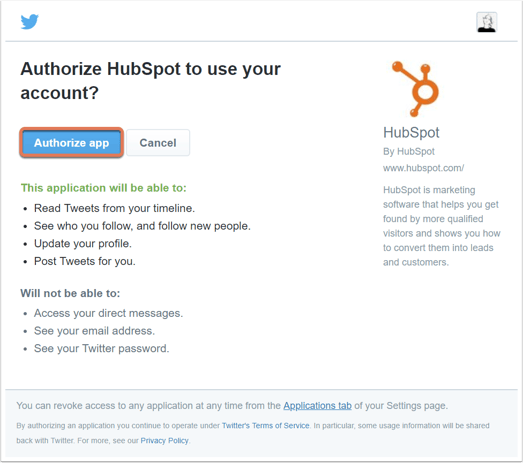
- In the dialog box, review the requested permissions, then click Authorize app.
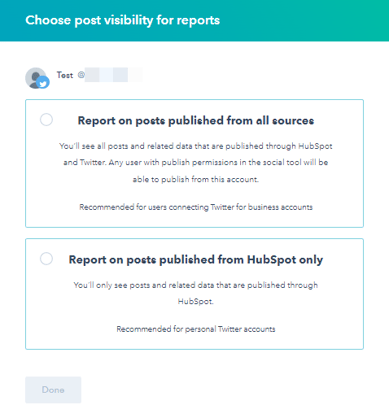
- Select an option to determine the publishing data that will be included in your social reports:
- Report on posts published from all sources: social posts published from HubSpot and published directly in your social accounts will be included in your social reports. If you choose this option, any user with publish permissions in the social tool will be able to publish from the Twitter account you connect.
- Report on posts published from HubSpot only: only social posts published from HubSpot will be included in social reporting.
- Click Done.
Necessary disclosure: after you connect your Twitter account, you can create and schedule posts through the HubSpot Social tool. Your Tweets are stored but will only be posted at the time you schedule. HubSpot will also add the tracking code to any URL generated when you're drafting a Tweet, solely for the purpose of tracking clicks. HubSpot will also store replies to and analytics for the performance of your Tweets.
Connect a LinkedIn account
Follow the instructions below to connect your personal Linkedin account. You can also connect any LinkedIn Company and associated Showcase Pages that you have administrator role privileges for. However, you cannot connect a LinkedIn Group to your HubSpot account.
Please note: due to LinkedIn's data retention policy, all LinkedIn data (impressions, clicks, interactions, etc) will be deleted from HubSpot after 1 year. You can still view this data by logging in to your connected LinkedIn account.
To connect your account:
- In the dialog box, select LinkedIn.
- You'll see your personal LinkedIn account, as well as any LinkedIn Company Pages you have admin privileges for. Select the checkbox next to any LinkedIn account or page you want to connect.
- Click Connect.
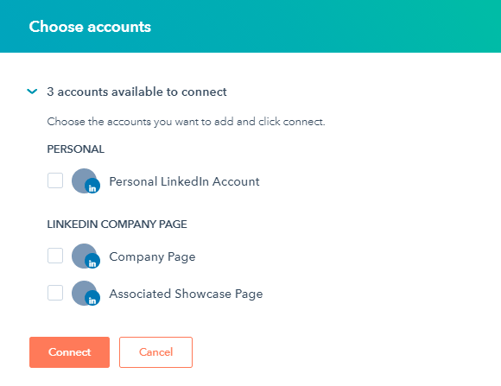
If you encounter any issues while trying to connect your LinkedIn page, or you don't see one of your pages available for selection, check out the troubleshooting guide for connecting your LinkedIn page.
Necessary disclosure: after you connect your LinkedIn account, you can create and schedule posts through the HubSpot Social tool. Your posts will be stored but will only be published them at the time you schedule. HubSpot will also add the tracking code to any post URL generated when you're drafting a post, solely for the purpose of tracking clicks. HubSpot will also store comments, replies, and analytics for the performance of your posts.
Connect a YouTube account (Marketing Hub Enterprise only)
To analyze your video performance data, you can connect your YouTube account to HubSpot, as long as it meets the following criteria:
- Your account must not be set to private.
- Your account is a brand channel.
- Your account has at least one video uploaded.
To connect your account:
- In the dialog box, select YouTube Reports.
- A pop-up window will appear. If you have multiple Google accounts, select the specific account to connect in the dialog box.
- Next, select your YouTube account or a brand account.
- Review the requested permissions, then click Allow.
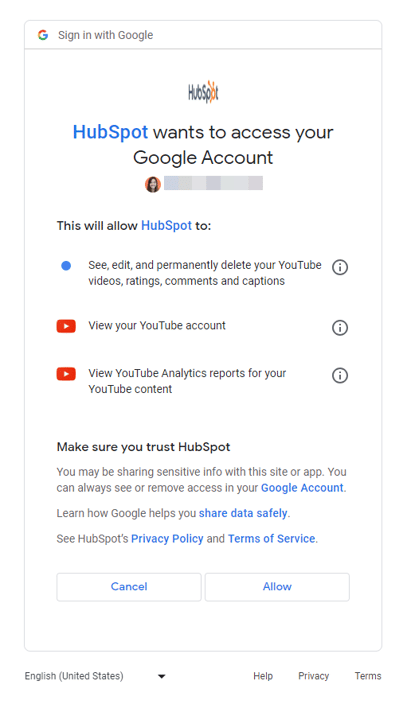
Necessary disclosure: this feature uses YouTube's API Services. By connecting your YouTube account, you agree to comply with YouTube's Terms of Service.
