Last updated: April 3, 2024
Available with any of the following subscriptions, except where noted:
 Marketing Hub
Professional
,
Enterprise
Marketing Hub
Professional
,
Enterprise
|
| Legacy Marketing Hub Basic |
X streams are searches that HubSpot uses to monitor conversations and display them in your social monitoring tool.
You can use these conversations to create content and attract visitors to your website. In addition to creating your stream, you can view streams of your timeline, mentions, reposts, and sent messages.
Please note: repost, keyword, and mention streams that have not been viewed for 30 days will be marked as inactive. Inactive streams will be disconnected and no longer update. Any email notifications you have set up will be paused. To reactivate a stream and resume email notifications, you will need to edit the stream and reconnect it.
Before you get started
Before setting up your X stream, please note the following:
- To create X streams in HubSpot, you'll need to connect your X account and select Report on posts published from all sources.
- You cannot create a stream based on a private list through HubSpot.
- Your X stream will only display posts from the past seven days.
- It can take up to 4 hours for your stream to update with new activity.
Create a new X stream
To create a new X stream:
- In your HubSpot account, navigate to Marketing > Social.
- Click the Monitor tab.
- In the left sidebar menu, under X Streams, click Create stream.
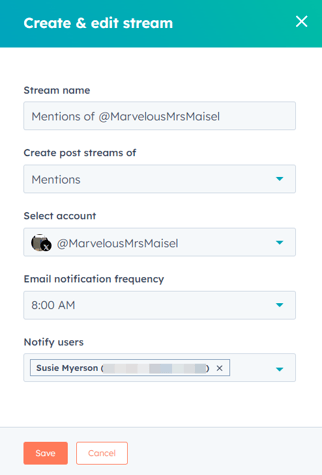
- Set up your new X stream:
- Stream name: enter a name for your X stream.
- Create post streams of: select an option for whose posts you can monitor.
-
-
- Reposts: HubSpot will search and listen to reposts of your X posts.
- Mentions: HubSpot will search and listen to posts that mention your X account.
- All of Twitter: HubSpot will search and listen to posts from everyone on X for any of the selected keywords.
- A Twitter List: HubSpot will search and listen to your selected X lists. You can only use public X lists.
- A HubSpot contact list: HubSpot will search and listen to posts based on one of your HubSpot lists.
- Twitter account: select an X account to monitor the stream from.
- That contain: enter one or more keywords to listen for.
- Use commas or tabs to separate multiple keywords.
- If you enter more than one keyword, a post will be included in your stream if it contains any of the keywords you have entered.
- X streams use X's search API to return results. It is recommended to limit your searches to 10 - 15 keywords. Keywords above this limit may not work.
-
Notification frequency: select when the notification email should be sent.
-
Click the Notification frequency dropdown menu. Then, select None, 8:00 AM, or 8:00 AM & 4:00 PM.
- Click the Notify users dropdown menu. Then, select a user from your HubSpot account.
-
-
-
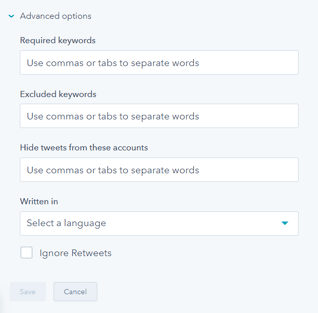
- To show additional options, click Advanced options. If you've selected All of Twitter, you can set any of these additional options:
- Required keywords: your stream will only return posts that include the keywords entered into this field. For example, if you had a stream monitoring for the phrases ice cream and frozen yogurt, you could add a required keyword of free to monitor for any posts about free ice cream or free frozen yogurt.
- Exclude keywords: your stream will only include posts that do not contain this keyword. Using the free ice cream example, adding sorbet as an excluded keyword would exclude any posts that also mentioned sorbet.
- Hide posts from these accounts: your stream will exclude posts from accounts that you add here. For example, you could use this option to filter out the posts from your employees.
- Written in: your stream will include posts that meet your criteria, but only if they are posted in the language that you select here.
- Ignore reposts: select this checkbox to ignore and exclude reposts from your stream.
- To show additional options, click Advanced options. If you've selected All of Twitter, you can set any of these additional options:
Edit or delete your X streams
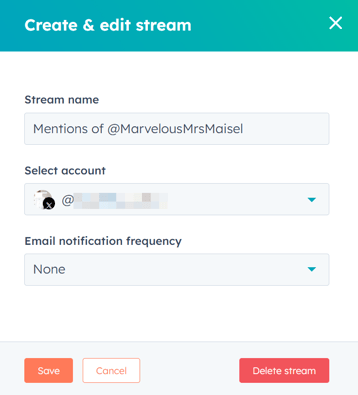
To edit or delete your X streams:
- In your HubSpot account, navigate to Marketing > Social.
- Click the Monitoring tab.
- In the left sidebar menu, navigate to an X stream.
- To edit your X stream:
- At the top right, click Edit.
- Edit the various options on the left side of the stream.
- After editing your stream, in the bottom left, click Save.
- To delete your X stream:
-
- At the top right, click Edit.
- At the bottom right, click Delete stream.
- In the dialog box, click Delete.
Interact with posts in your streams
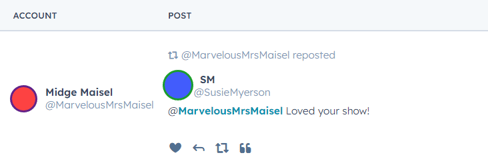
To reply, repost, like, or quote posts in your X streams:
- In your HubSpot account, navigate to Marketing > Social.
- Click the Monitoring tab.
- Navigate to the post that you want to interact with.
- To like a post, at the bottom of a post, click the like icon.
- To reply to a post:
- At the bottom of the post, click the reply icon.
- In the text box, enter your reply and click Reply.
- To repost a post and send it to your follower base, at the bottom of a post, click the repost icon.
- To quote a post:
- At the bottom of the post, click the quote icon.
- In the right panel, add your own content to accompany the original post.
- In the bottom left, click Publish post now or Schedule post.